
Everything that has a day
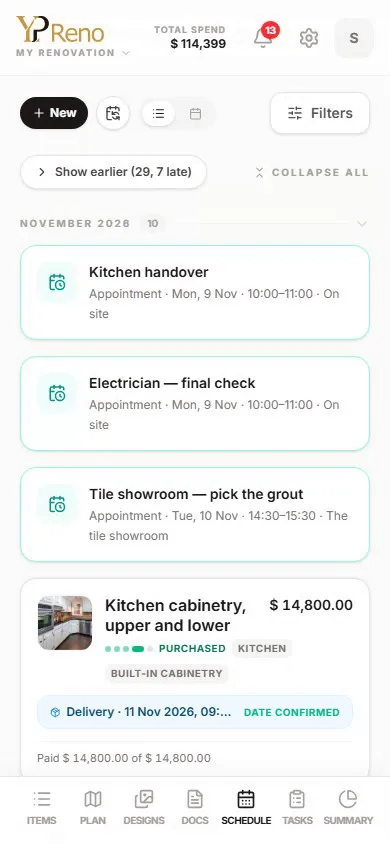
Deliveries, installations, appointments and task deadlines on one schedule, as a list or a calendar. The list starts at today; what is already behind you folds away above it, and anything late says so.
Schedule and tasks
The sofa arriving, the worktop going in, the electrician’s visit and the day the painting must be finished — together, starting with today. Book the appointments, say who must be there, and see it all in your own phone’s calendar.
Deliveries, installations, appointments and task deadlines on one schedule, as a list or a calendar. The list starts at today; what is already behind you folds away above it, and anything late says so.
A name, a day, a time and a place — and the people who must be there, from the project or from outside it. If it moves or is cancelled, everyone on it from the project is told. Cancelling asks you first.
Press Add to my calendar and follow the steps for iPhone, Android or Outlook. Your calendar shows what you must attend, or everything you can see, and keeps itself up to date. It never shows prices.
You and your admins always can; editors, designers and contractors can to begin with; viewers never do. Somebody here for one job books only if you allow it. One switch each, in your project’s permissions.


Tasks
“Seal the balcony decking”, who is doing it and by when. The person doing it sees it; somebody brought in for one job sees only the tasks they are on.
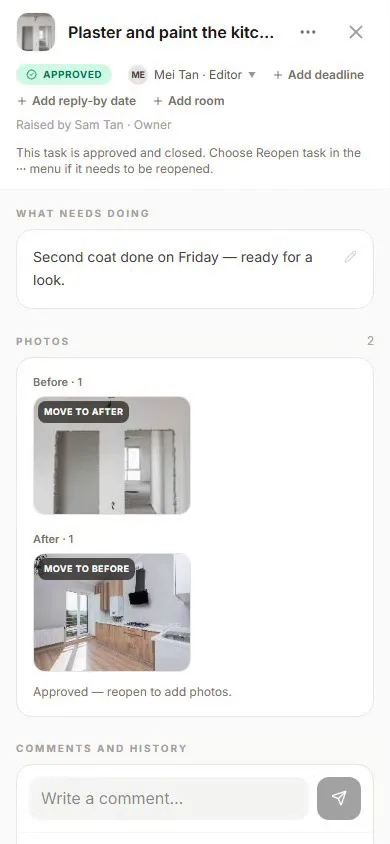
Photos taken on site are marked Before or After, so the state of the wall is on record before anyone touches it — and what it looks like when they are done.
When the work is done, it waits for you. Approve it, or send it back with a note saying what is missing. An approved task stays as it was signed off.
Who changed what, and when — the status, the photos and every comment — in the task’s own history.