

In the shop, on your phone
Standing in a showroom, take the photo, paste the link, put in the price. It is on the list before you leave the building, and the project total has already moved.
Before you have decided
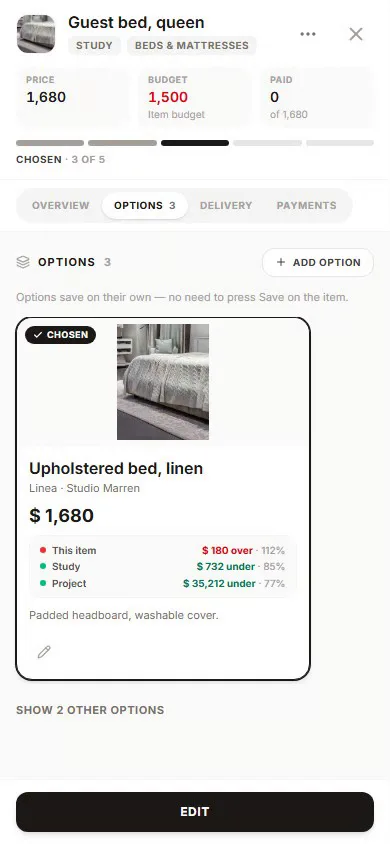
An item does not need a price, a picture or a link to exist. Put in "bed" because you know you need one, then add the beds you are considering as options — a photo, a price, the shop — and compare them in one place. Choose one and it becomes the bed; it then moves on with you, from purchased to delivered, and installed if it needs fitting.
Standing in a showroom, take the photo, paste the link, put in the price. It is on the list before you leave the building, and the project total has already moved.
Up to twelve candidates for one item, each with its photo, price and shop, and how each one sits against your budget. Your designer can add options too; choosing stays with you.
The list is not only what you have bought. It is what you have decided, what you are still choosing, and what you have not started thinking about — so nothing is forgotten between one shop and the next.
One trip to one shop can produce twenty-five things. Enter the names in one screen, then set the store, the receipt and the delivery window once for all of them rather than twenty-five times.



And the rest of it
Give an item a delivery window — a date, or a window with times — and see the whole renovation as a calendar or a list. Mark the date confirmed when the store confirms it, and delivered when it turns up. Something that needs fitting gets its installation date on the same schedule. And an item does not need a price to be on the schedule. "Internet installation" with no cost still lands on the calendar on the day it happens.
Quotes, contracts and drawings kept with the project rather than in an inbox, in folders of your own. Uploaded once, there for everyone who is allowed to see them.
One receipt usually covers several items. Attach it once and point every item on it at the same file, instead of uploading the same photograph six times.
Keep the floor plan with the project, and the designs beside it — photographs, a PDF deck, a 3D tour — so everyone is arguing about the same picture.
